


- Overview
- Transcript
3.4 Add Twitter Widgets
In the AMP version of our site, we used AMP’s custom amp-twitter element to embed some tweets. In this lesson, we’ll go through how to use Twitter’s own widget script instead, as well as setting up a graceful fallback for that script.
1.Introduction
1.1Welcome to the Course!01:00
1.2Why Optimize Your Website Without AMP?12:25
1.3Overview of What We’ll Be Making05:36
2.Optimization Setup
2.1Optimization Checklist07:28
2.2Project Setup08:38
2.3Set Up the CSS08:20
2.4Set Up the HTML09:35
2.5Set Up the JavaScript06:10
3.Let the Optimizing Begin
3.1Add Lazy Loading Images and iFrames11:13
3.2Responsive iFrames Without Reflow04:17
3.3Image Gallery With Lightbox04:33
3.4Add Twitter Widgets03:58
3.5Add Carousel08:08
3.6Deployment Optimization05:49
4.Conclusion
4.1Checking Off the Checklist04:49
3.4 Add Twitter Widgets
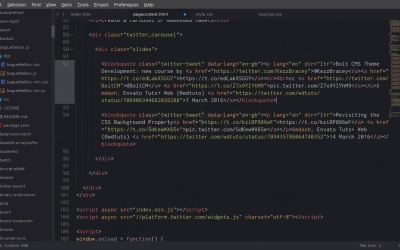
Hey, welcome back to optimize your website without AMP. In this lesson we are gonna get three tweets, and we're gonna embed them in the bottom of our page. And then later on in the next lesson, we're gonna turn those tweets into a carousel, and we're gonna all of this in an optimized way, of course, without AMP. So this is one of the tweets that we wanna embed into our page. In AMP you would use the amp-twitter custom element. But instead we're just gonna take a fairly simple approach and we're just gonna use the default embed code. So up in the top right corner here, you're gonna click the Embed button. And then we're just gonna copy this code, and in our page content we're going to add it in here. Now before we do that, we actually just wanna add a div with the class slides. And that just gets us set up for the carousel that we're gonna be doing in the next lesson. And then we're gonna add in our code here. Now you'll notice that Twitter is bringing in its own JavaScript tier to handle these tweets that we wanna embed. Unfortunately, there's no way to self-host the JavaScript that's necessary to embed a tweet into your page. It has to come from Twitter. So unfortunately there's no way to minify it in with the rest of your JavaScript. But something to be aware of is that, every time you grab embed code from a tweet, it's gonna give you this script. So you don't wanna have it in there multiple times for each of your tweets, you only want it once. So once you paste in the code for your first tweet, grab the script and then add it in down here to load with your other JavaScript. And remember that we wanna load JavaScript last, because then it's not clogging up the pipeline and everything else on the page can get processed first. And you'll notice that we're also using async on this grouped tier, so that falls inside the principles that we wanted to stick with in our optimization checklist, that we only use asynchronous JavaScript. So there's our first tweet. And I'm just gonna add in another tweet. And then there's our third tweet. You can embed any tweets you like as you're working on this, or you can just grab this code out of your finished source files. So now if we go check out our site and we scroll down, we can see there are our three tweets. And that's all working perfectly. However, right now if we disable JavaScript, we've got some pretty messed up looking default text here. So creating a noscript fallback for this is pretty easy, because all you have to do is just style up the block quotes that Twitter's script takes, and turns into an embedded tweet. So this is actually the advantage that you get over using the amp-twitter element. Because with this, there is no fallback text that you have to work with. There's no block quote or a plain text that you can just style up. So that's a bit more painful to create a fallback for. We have all this plain text, so all we need to do is target these block quotes inside our noscript style sheet, and then we'll have our fallback simple as that. So I'm just gonna target any block quote that's inside a div with that class slides that we wrapped around our embedded tweets. And then we're just adding a nice border color. A bit of space at the bottom, and then we're controlling the color of the links. So now if we go back and check out what we've done. Now with that JavaScript active, even though we don't have the full embedded tweet, people can still read the content of the tweet, so they're not completely missing out. So that part of the process is pretty straightforward. We've got all of our Twitter widgets in here, and we're still making sure that we only use asynchronous JavaScript and we have a noscript fallback. So in the original AMP version of this website, we also then turned our embedded tweets into a carousel, and we wanna make sure that we go shot for shot, feature for feature. That we do everything that we did in the AMP site, we do it in our own way, and we still end up with a site that loads as quick or quicker. So in the next lesson we're gonna go ahead and recreate this carousel function using our own scripts, and our own optimization techniques. So I'll see you in the next lesson.





