

- Overview
- Transcript
1.2 Browser and Fallback Support
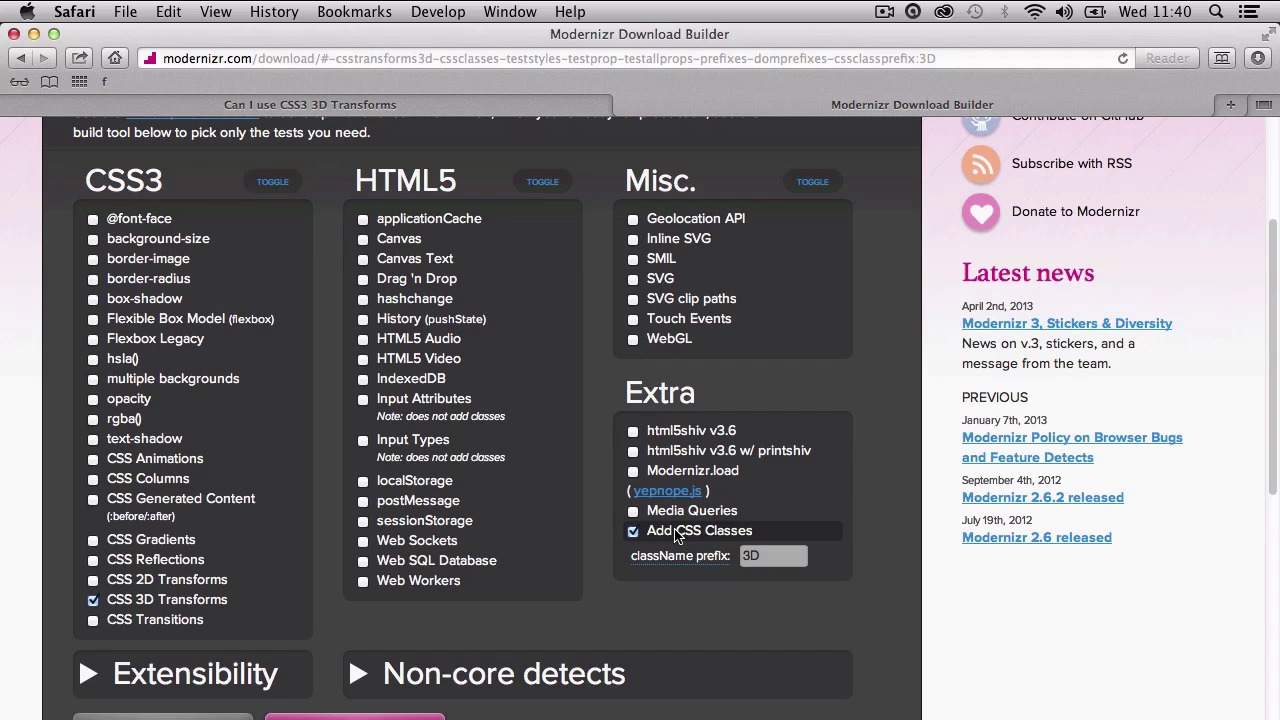
The new browsers have many new features available but the concept of support has never been greater. If your website has new features it could potentially invalidate old browsers eliminating a large market share which is never good for business. So in this lesson we’ll cover using Modenizr to keep track of supported browser features.
1.Introduction
1.1Why use CSS 3D?03:39
1.1
Why use CSS 3D?
03:39
1.2Browser and Fallback Support04:11
1.2
Browser and Fallback Support
04:11
2.Getting Started with CSS 3D
2.1Understanding the 3D Environment08:30
2.1
Understanding the 3D Environment
08:30
2.2Using CSS 3D Transformations16:53
2.2
Using CSS 3D Transformations
16:53
2.3Using CSS 3D Origin and Perspective26:43
2.3
Using CSS 3D Origin and Perspective
26:43
2.4Creating a 3D Cube: Part 125:23
2.4
Creating a 3D Cube: Part 1
25:23
2.5Creating a 3D Cube: Part 216:10
2.5
Creating a 3D Cube: Part 2
16:10
2.6Using CSS Animations and Transitions20:03
2.6
Using CSS Animations and Transitions
20:03
3.Advanced CSS 3D
3.1Using Nifty Modal Dialog Box13:14
3.1
Using Nifty Modal Dialog Box
13:14
3.2Using Impress.js22:40
3.2
Using Impress.js
22:40
3.3Using Oridomi.js28:39
3.3
Using Oridomi.js
28:39
4.Final Project
4.1Adding Content to the Cube: Part 128:23
4.1
Adding Content to the Cube: Part 1
28:23
4.2Adding Content to the Cube: Part 232:11
4.2
Adding Content to the Cube: Part 2
32:11
4.3Providing Fallback Support23:51
4.3
Providing Fallback Support
23:51
5.Conclusion
5.1Conclusion and Goodbye01:57
5.1
Conclusion and Goodbye
01:57





