

- Overview
- Transcript
2.3 Configuring Motion UI
Let’s talk about configuring Motion UI. This library has a few settings which can be changed from within the Sass files. Let’s see what those are.
2.3 Configuring Motion UI
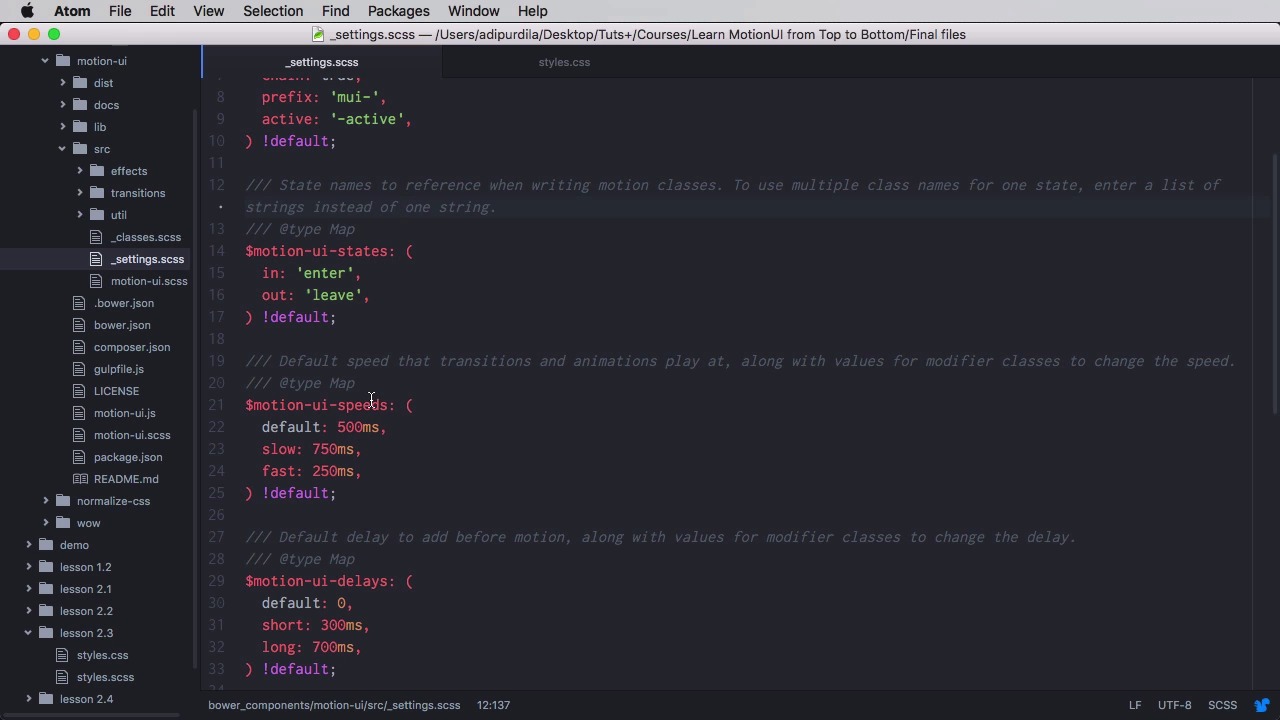
Let's talk about configuring motion UI and being a SaaS library, there are a few options you can change from SaaS. So let's see what those are. These settings can be found in the motion-ui folder from the repository. So if you download it from GitHub or if you use Bower or NPM, go ahead and find the motion-ui folder, go to src and then go to settings. And on the settings you'll find all the variables that it can change. And there are six of them I think, one, two, three, four, five and six in the form of maps with key value pairs. So the very first one is that motion-ui-classes and here we can change some of the prefixes that the classes are using. Remember, let's actually open a lesson here. So sliding down mui-enter, right? So you can change this prefix here if you want. On the active side you have this bit. You can change it as well. Then on states you have enter, and you have leave. You can change this to whatever you want, for example start or end. Then, the speeds. As I was saying in the transitions lesson, the default animation speed is 500 milliseconds with these two additional modifier classes of slow and fast. You can change these to whatever you want. Then there's the delays, same thing. Easings, you can change these. You can add your own if you want, really easy. And then finally there is settings. Now on these settings you can change whether or not fade can also be applied to elements with other transitions. And finally you have this option which allows you to change the class name that activates the queue class. In the previous lesson I showed you how to create animation series and the way to trigger that was to add the is-animating class to the parent of the items you want animated. Well, if you wanna add your own class name, you can do it here. So, if you want, this is how you can customize it, change whatever value you see here. Motion-ui recompile lists and motion-ui will automatically generate the proper CSS with class names and everything you need based on these new values. And that wraps up this lesson. Next time you'll learn how to integrate WOW.js with motion-ui and create animations that start when elements scroll into view. See you next time.





