

- Overview
- Transcript
1.2 What Is a Pricing Table?
Before we start laying down best practices, let’s go back to basics and answer the following questions: what is a pricing table, and when should you use one?
A pricing table is an element with the task of helping users choose the best product or pricing plan for them. They do that by comparing their needs with each pricing plan’s features. Let’s take a look at some examples.
1.Introduction
1.1Welcome00:45
1.2What Is a Pricing Table?03:40
2.Correct Planning
2.1Be Consistent With the Website’s Design05:42
2.2Name Your Plans Suitably02:49
2.3Use a Sensible Number of Plans03:44
2.4Dial Down the Visual Noise05:04
2.5Make the Price Stand Out02:37
3.Focus on Your Customers
3.1Offer Multiple Payment Options02:32
3.2Highlight One Specific Plan02:19
3.3Offer Just the Right Amount of Information02:32
3.4Focus on the Benefits to the Customer02:19
3.5Make It Easy to Compare the Plans04:17
3.6Use a Clear Call to Action02:40
3.7Think About Mobile Users03:22
4.Conclusion
4.1The Conclusion02:46
1.2 What Is a Pricing Table?
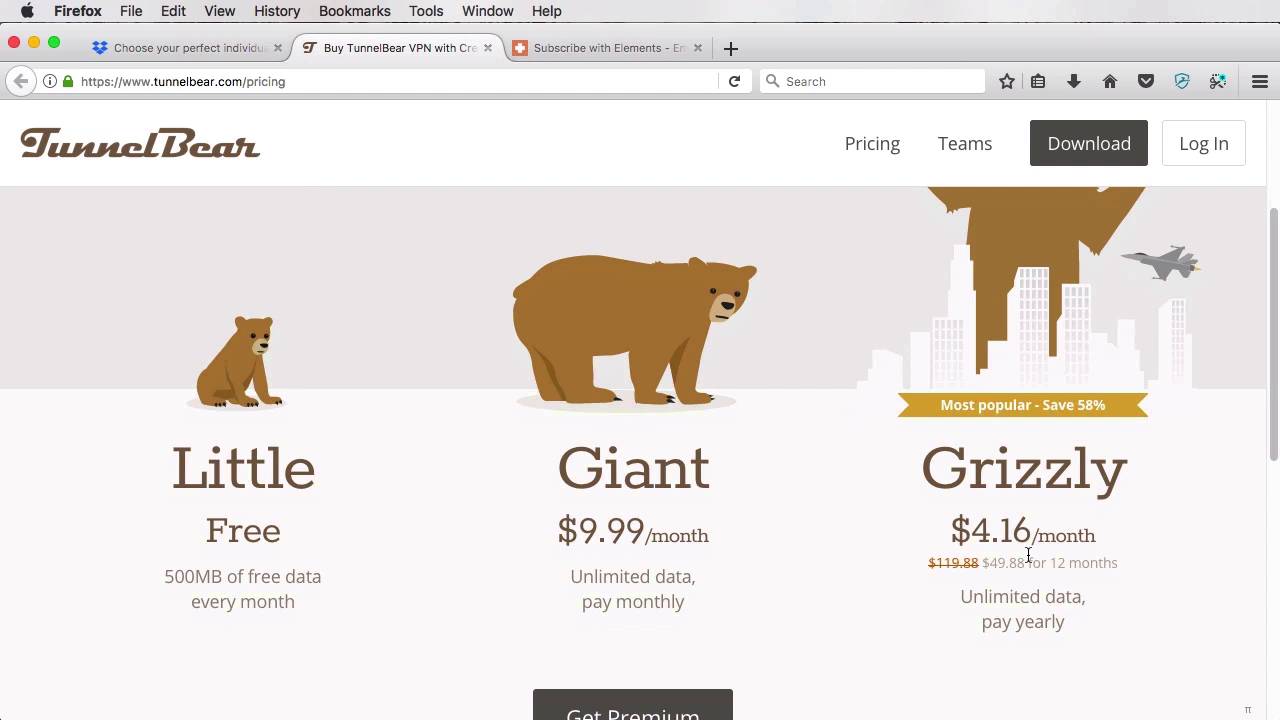
Before we start laying down the best practices, let's go back to basics and answer the following questions. What is a pricing table and when should you use one? Well, a pricing table is an element whose task is to help you choose a pricing plan. And users do that by comparing their own needs with the features that are offered by a specific pricing plan. So let me give you an example. Here, we are on the Dropbox pricing plan or the pricing page and Dropbox currently has to offer three pricing plans, a basic, a plus, and a professional. Each one comes with a different price. First one is free, actually. And each one comes with a description and a set of features. Now, depending on what you need in terms of storage and features, you would choose one of these three plans. Another example will be for TunnelBear, which is a VPN service. Now, TunnelBear also offers three plans, one that's free, it's only limited by the amount of data you can use each month. The second one starts at $10 a month with unlimited data and you have to pay monthly. And then there's the Grizzly plan which is basically just like this one, but it's half the price and you have to pay annually for it. So this is another great example of a pricing table. We have the three plans, each one with its different set of features. So depending on what you need, you would choose one or the other. Are you just an occasional user that wants to use a VPN on only very specific occasions? Well, probably the free plan is best for you. Otherwise, if you're a frequent user, you might go for the Giant or the Grizzly. So those are two examples of pricing pages. Now, when should you use pricing tables? Well, it's simple, a pricing table should be used when you have more than one pricing plan. In the two examples that I just showed you, each company had three pricing plans. So it makes sense to use a pricing table to showcase those plans and their individual characteristics. On the other hand, if your product or service has a single price, then you could do something like this. The Envato Elements, for example, offers their service plus Envato Tuts+ at $29 a month, so both of these services combined. They have a single price and they list that right here along with everything you get, all the features that you get for buying that product. So this is not technically a pricing table. But I gave you this example, so that you would know when it's necessary to create a pricing table and when it's not. Now that we've got the basics out of the way, let's start learning how to properly plan and design a pricing table. And we'll start with best practice number one, which is be consistent with the website's design. That's coming on next.





