
 Lessons: 17Length: 1.6 hours
- Overview
- Transcript
4.2 Critical Rendering Path
So what is the critical rendering path? Think of it as a series of steps the browser takes in order to display or render a web page.
Understanding how this works will allow you to optimize web pages for greater speed by showing the initial view faster. Let’s find out how.
Related Links
1.About Website Performance
1.1Welcome00:34
1.2What Is Website Performance?03:42
2.Tools for Measuring Performance
2.1Overall vs. Perceived Performance02:32
2.2Google’s DevTools14:30
2.3Google’s PageSpeed Insights03:22
2.4YSlow and Pingdom Website Speed Test08:51
3.Overall Performance Optimization
3.1Server-Side Optimization05:06
3.2Reducing HTTP Requests03:56
3.3Image and Webfont Optimization07:37
3.4JavaScript and CSS Optimization03:31
3.5Moving Assets Externally03:23
4.Perceived Performance Optimization
4.1About Perceived Performance02:39
4.2Critical Rendering Path03:45
4.3Render Blocking CSS17:20
4.4Render Blocking JavaScript11:44
5.Platform Optimization
5.1Optimizing WordPress Websites02:27
6.Conclusion
6.1Final Words01:00
4.2 Critical Rendering Path
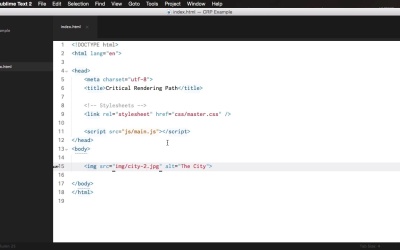
So what is the critical rendering path? Well, it's a series of steps that the browser needs to take in order to download and render a webpage. It's as simple as that. Now understanding how this works will allow you to optimize webpages for greater speeds by showing the initial view faster. But before we go there, let's define some of these terms. First of all critical means necessary. Rendering is just a fancy word for showing up a webpage or displaying a webpage in a browser. The path is that series of steps I mentioned earlier. So it's the set of actions the browser takes in order to render a web page. Finally, the initial view, I explained it in the previous lesson, is that section of the page that the users see first first without having to scroll down. It's also called the above the fold content. All right, now let's see how the critical rendering path works. For this, I'm gonna use a very simple example. A web page that loads a single image. Now, the HTML looks something like this. So, let's see what are the steps taken by the browser to get that page displayed. First off all the browser downloads the HTML file, which is this, index.HTML, then this page gets parsed, or read by the browser. The browser sees that there is one CSS file, one JavaScript file, and one image. Then, the image starts to get loaded. But the browser can not display the webpage just yet because it doesn't have the CSS and the JavaScript. So it needs to download those first before it can render anything. Why? Well, it's simple. Because the CSS might contain information or it actually does contain information most of the time on how that page should be displayed. And the JavaScript, it's the same thing. You might be using JavaScript to hide or show various elements on page load. So the browser downloads the CSS first It reads it, it sees if anything else is being called, for example using an import and then if it doesn't it moves on to the JavaScript. It downloads this one and only then, after everything is being loaded, then it starts to display the webpage. And that's how the critical rendering path works, basically. It's very, very simple. As you can see, the browser needs to download any kind of CSS or JavaScript files before It can render anything to the page. These are called render-blocking resources. And what I showed you on the Screencast is a very simple example. But imagine a WordPress theme that maybe loads several CSS files and several JavaScript files. Well, imagine the number of round trips you have the browser needs to do to the server and back to get those files to render them properly and so on. Performance wise it's not very good. Now let's see how we can optimize the critical rendering path by first tackling the render blocking CSS and that is coming up next.





