
 Lessons: 17Length: 1.6 hours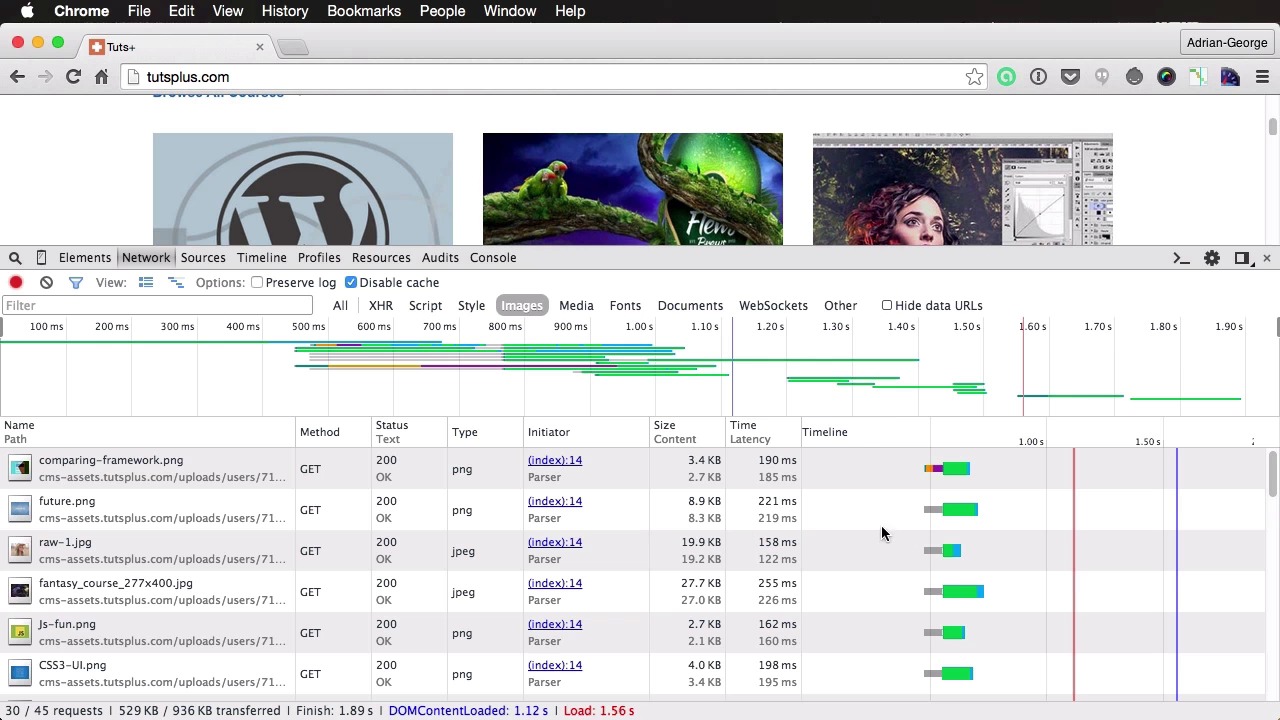
- Overview
- Transcript
3.2 Reducing HTTP Requests
What is an HTTP request? It’s a request made from the browser to the server for an asset. That asset could be an image, a CSS file, a script, the actual HTML document, or a number of other things.
In this lesson you’ll learn why it’s important you keep these requests to a minimum.
Related Links
1.About Website Performance
1.1Welcome00:34
1.2What Is Website Performance?03:42
2.Tools for Measuring Performance
2.1Overall vs. Perceived Performance02:32
2.2Google’s DevTools14:30
2.3Google’s PageSpeed Insights03:22
2.4YSlow and Pingdom Website Speed Test08:51
3.Overall Performance Optimization
3.1Server-Side Optimization05:06
3.2Reducing HTTP Requests03:56
3.3Image and Webfont Optimization07:37
3.4JavaScript and CSS Optimization03:31
3.5Moving Assets Externally03:23
4.Perceived Performance Optimization
4.1About Perceived Performance02:39
4.2Critical Rendering Path03:45
4.3Render Blocking CSS17:20
4.4Render Blocking JavaScript11:44
5.Platform Optimization
5.1Optimizing WordPress Websites02:27
6.Conclusion
6.1Final Words01:00
3.2 Reducing HTTP Requests
What is an HTTP request? Well, it's a request made by the browser to the server for an asset. An image, a style sheet, a script or even the main HTML document. Every reference like this that you put in your page will lead to an HTTP request and this, just like the DNS look up, takes time. How much time? Well let's see an example. Now for this we're gonna to use the Google or Chrome dev tools and we're gonna do a refresh here on the tuts+ site so we can see how many HTTP requests we have. And if we look here on the bottom we can see that we have 45 requests. Now everything you see in green here is basically the round trip, the server round trip, time. So the time it takes from the request to the response from the server. And the stuff you see in blue is the actual download time. So in most cases you see that the request time, or the waiting time as it's called here, is bigger than the download time. An exception, of course, could be made on this script. So this one actually has a waiting time of 50 milliseconds and a download time of 200 milliseconds. But other than that, most of the time spent on downloading this resource is actually on waiting for the response from the server. So that's why it's important, just like I was saying in a previous lesson, that's why it's important to keep the HTTP request number as low as possible. Now let's actually take, let's say this image here and this image here. And these images combined they have. Oh, let me actually see if I can get this. They have a waiting time of 140 plus 43, so around 180 milliseconds waiting time, not download time. But if you combine these two in a sprite,] you would only get a single waiting time. And of course, that would depend on the server, but it would eliminate that extra HTTP request. And let's say you were gonna take these three images. Well, instead of three large waiting times, you would get a single waiting time and a download time that is a bit bigger. But overall that is going to be much better than having three distinct requests. So this is definitely something to keep in mind when optimizing for performance. Now before I end this lesson I want to touch on something really quick and it's about HTTP version two. According to a report from Ars Technica, this is finished already and it already has started to be implemented in some browsers. Now a cool new feature of this new protocol will be something called server push, which will basically allow the browser to download multiple files in a single HTTP request. How good this will be remains to be seen, but it's definitely something to keep an eye on. For more details, check out the lesson notes. All right, that's it for this lesson. And since you've learned about HTTP requests, it's time we take a closer look at the elements that are subject to those requests. So in the next lesson, we'll have a look at images and web fonts.





