

- Overview
- Transcript
2.5 Adding Pages
In this lesson, we’ll add two additional pages to our store: “about us” and “contact us”. Let’s begin.
1.Introduction
1.1Welcome to the Course00:57
2.Building the Store
2.1A Bit of Planning03:36
2.2Creating the Store01:54
2.3Creating Collections05:45
2.4Adding Products to Our Shopify Store13:03
2.5Adding Pages03:52
2.6Installing a New Shopify Theme04:07
3.Customizing the Store
3.1Homepage18:11
3.2Collection and Product Page03:49
3.3About and Contact Page05:18
2.5 Adding Pages
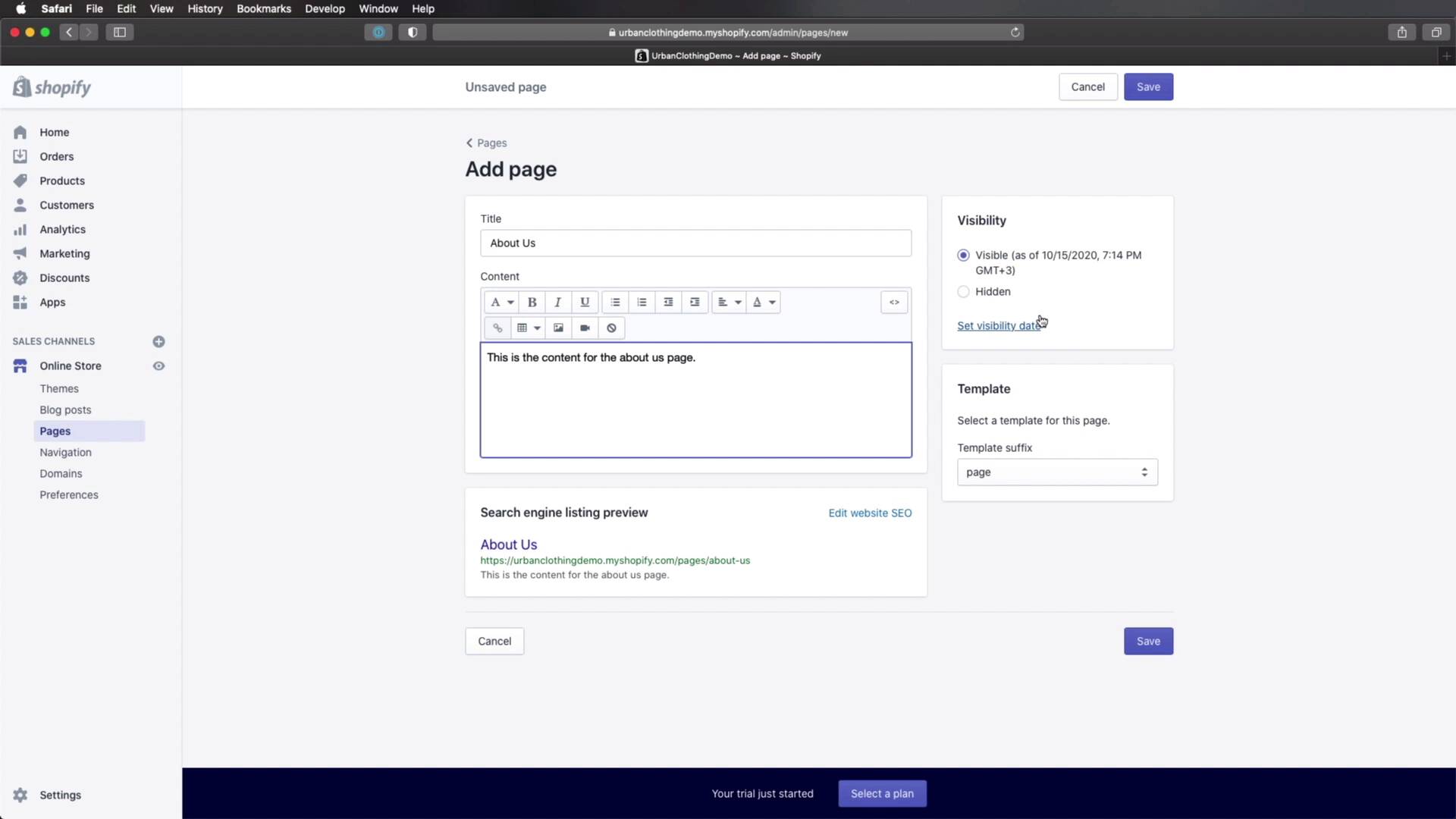
Welcome back to the course. In this lesson, we'll add two additional pages to our online store, a contact page and an about page, so let's begin. Adding pages is very, very simple. Once you're in the admin interface, click on Online Store pages and then Add page. Let's create the about page right now about us here. You can add the content and that content is gonna show up on the front end. So just to give you an idea, I'm gonna say this is the content for the about us page. Now, I specifically added this demo content because once we add our theme this will be hidden and it's all down to what template you're using for the page. And the currently active theme, we have two templates we can choose from, we have a simple page and a page contact. Now, the simple page will most likely display this content that I wrote right here. However, when we're gonna switch our theme, we're gonna have a lot more templates to choose from, and you'll see that some of those templates don't even display the content you write here. Instead, you can use a visual builder to edit your content. But more about that in a future lesson for now, I'm gonna set the title, this content. I'm not gonna bother with the template right now and the visibility we can set this up as visible right now. And once we're done, hit save. Next, let's create another page. This will be for contact us for content. I'm just going to enter the same demo content or a similar content as the previous page. Also visible, also the template. I'm just gonna leave it on default and click Save. So now if we go back to our pages, we can see the two let's call them additional pages that we created. Because we're using Shopify the rest of the pages that you expect from an e-commerce website are already created like the homepage, a product page, collection page, cart, and so on and so forth. These are just two additional ones We needed for this project. All right, so with the pages added, we're pretty much good to go in terms of content. But what about presentation? Currently, we're using the default theme provided by Shopify, but that doesn't really cut it for us. I actually didn't even show you. Let me do that right now. If we move back here in the admin interface we have this eye icon and when we click on this it's gonna show us a preview of our front end or our actual store. And as you can see, this is the default theme, and I personally don't like this very much. We're gonna be using a new theme and we'll do that in the next lesson. So I'll see you there.





