
 Lessons: 16Length: 2.6 hours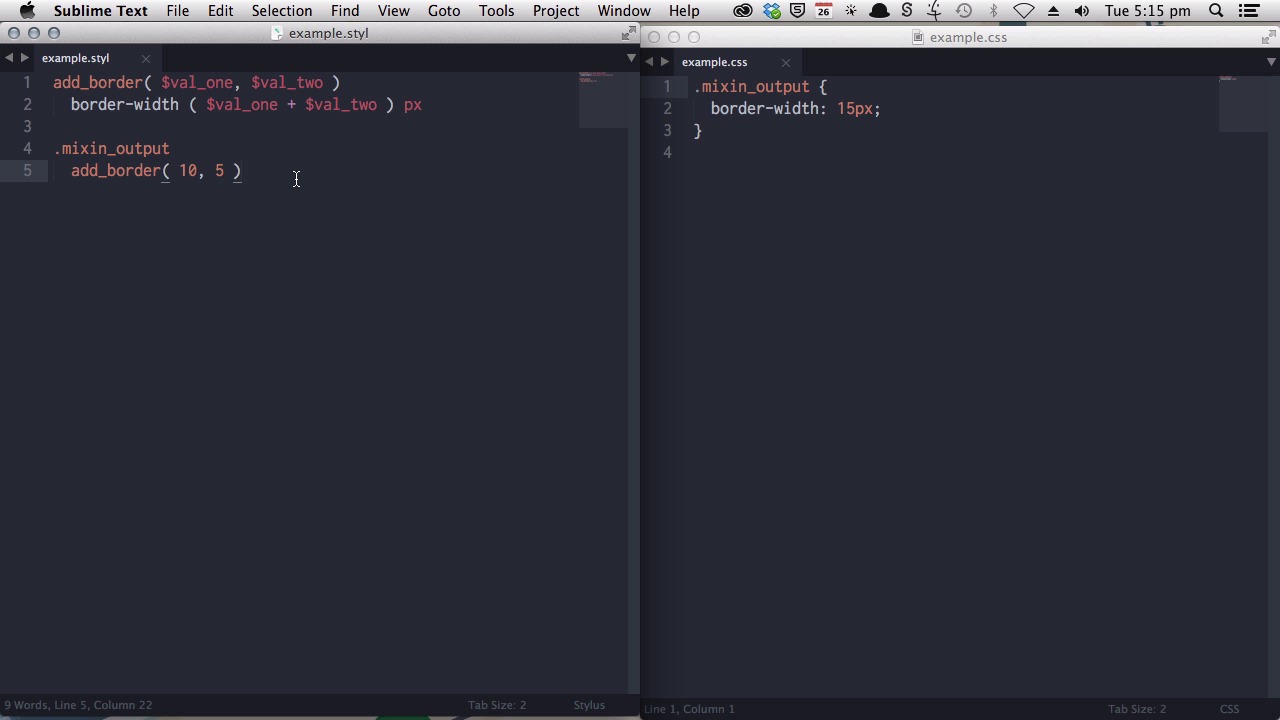
- Overview
- Transcript
5.2 What Functions Can Do That Mixins Can't
In Stylus, mixins and functions look virtually identical, however they have one very important distinction. Learn what functions can do that mixins can’t in this lesson.
1.Introduction
1.1CSS Needs a Hero01:17
2.Stylus Superhero Basic Training
2.1Quick and Easy Setup09:19
2.2Terse or Full Syntax, Your Choice05:50
2.3Faster Child and Pseudo Element Targeting via Nesting06:50
3.A Practical Intro to Stylus Variables
3.1Create an "Easy Update Color Scheme"08:02
3.2Create a "px to rem" Converter Variable14:35
4.Practical Intro to Mixins
4.1Create a "Zebra Stripe" Mixin12:45
4.2Use CSS3 Easily with Prebuilt "Nib" Mixins09:07
5.Practical Intro to Logic and Functions
5.1Adjust Base Font Size, Perhaps: Using Conditionals and Operators09:38
5.2What Functions Can Do That Mixins Can't06:16
5.3Create a "px to rem or em" Converter Function13:55
5.4Level Up Your Color Schemes With Stylus's Built-In Functions15:13
6.Stylus Superpowers
6.1Variables on the Fly: Property Lookup09:32
6.2Create a "Golden" Layout14:54
6.3Generate H-Tag Styles With a Single Line: Hashes, Iteration and Interpolation16:49
7.Conclusion
7.1Wrapping Up02:34
5.2 What Functions Can Do That Mixins Can't
Hi. Welcome back to Become a CSS Super Hero with Stylus. In this lesson you're gonna learn about what Stylus functions can do that Stylus mix-ins can't. And, it's important to understand this distinction, because when you're actually creating a function, or a mix-in, they look pretty much the same. If so, if I was to write a mix-in, it would look like this. And, if I was to write a function, it would look like this. So, at first it's hard to sort of intuitively, intuitively grasp, what the difference between the two is. And, there is really one difference, that is quite important, that determines when you would wanna use one or the other. A mix-in as you learned in one of the previous lessons is designed to output a few lines of actual CSS. A function, on the other hand, is designed to return a value. And, then you use that value within your CSS code. Now, let me show you an example of what I'm talking about. [BLANK_AUDIO] Now, say I wanted to add to get the two numbers to create a new border with a certain width. With the mix-in, I could do something like this. Add border, value one, value two. And, then I would need to write the actual CSS line that I want to have output, with both the property and the resulting value. So, if I wanted to add these two numbers together, I would have to say value one plus value two, and then I might put a pixel unit on the end. Now, if I want to see that come out in my CSS, I would do something like a class name, mix-in output, and then, I would call that mix-in, passing some arguments. Now, this should give me border width of ten plus five, so what we should see come up in our CSS is mix-in output with border width 15. All right, so that's what we have. But, what if I want to be able to add these two numbers together? But, I want to use those numbers, not just in a border width property, but maybe I want to, add, use this same number against some, padding, or against a line height. I wouldn't be able to do that with this mix-in, because I've already specified the CSS property that's being used. When all I really want is just to get this number. That's what is meant when you talk about returning a value. So, with a function, I can have it just figure out this number, and then return the value to me, so that I can use it elsewhere in my code. So, instead of just saying add border, let's say, add anything. Now, it's gonna look very much the same as before. You can even copy and paste it. We still have the same arguments being passed. Only this time, we're not going to write the CSS inside the function itself. We're just going to tell the function to add these two numbers together. So, this is the part that we want. Now, what will happen when we use this, is it will just figure out how much we get when you add these two values together. And, it will return that number to us. Now, let's see the difference. With function output, I can now use this particular function in any way I want. Now sure, I can still use it to generate a border width. So, if we say, add anything, and again, with 10 and 5, and then I'll add the little pixel value at the end. This will still give us the same CSS output. But, if I wanna use it in a different way, I can. So instead, maybe I want to use it to figure out how much padding I need to have. We'll just give it some different values. And, that has also worked. Or, maybe I want to set some line height, and give it some more new values. And, that worked as well. So, to recap, a mix-in is something that you will use when you want to output actual CSS like this. And, a function is something that you use when you want to perform some type of calculation, some type of adjustment to the information that you're passing into the function. And, then you just want to get a value out that you can place anywhere you'd like in your CSS. In the next lesson, you're going to learn how to write your own functions. And, we're going to start with something you're already familiar with. And, that is the pixel to rem converter. We would use it as a, where we created it as a variable before, now we're going to generate that same functionality, but we're going to do it via our function. And, we're going to set this function up, so that we can have a pixel converter, not just to rems, we can have it also to generate m values if we choose. I'll see you in the next lesson.





