

- Overview
- Transcript
5.8 Fixing the Second Hand Animation
Having created our animation, we’ve noticed a slight problem once the time switches over from 59 to 0 seconds. In this lesson, we’ll talk about a way to remedy that issue.
1.Introduction
1.1Introduction00:52
1.2Downloading Snap.svg07:42
2.Creating Graphics in a Snap
2.1Creating Basic Shapes09:38
2.2Complex Shapes08:16
2.3Shape Attributes05:57
2.4Grouping Shapes07:23
2.5Shape Transformations08:37
3.Animating in a Snap
3.1Animation Basics06:58
3.2Animation Callbacks04:53
3.3Easing06:26
4.Basic Interactivity
4.1Installing MAMP03:33
4.2Using an External SVG08:46
4.3Targeting Individual Shapes08:58
4.4Basic Interaction06:32
4.5Hover Events03:32
5.SVG Clock Animation
5.1Importing the Clock SVG06:08
5.2Targeting Individual Clock Shapes08:30
5.3Pulling the Current Time08:30
5.4Organizing the Code05:32
5.5Time Is Circular07:26
5.6Staying Current03:08
5.7Animating the Second Hand03:11
5.8Fixing the Second Hand Animation08:51
5.9Minutes and Hours09:43
5.10Adjusting the Hour Hand03:44
5.11Finishing Touches05:31
6.Conclusion
6.1Conclusion00:54
5.8 Fixing the Second Hand Animation
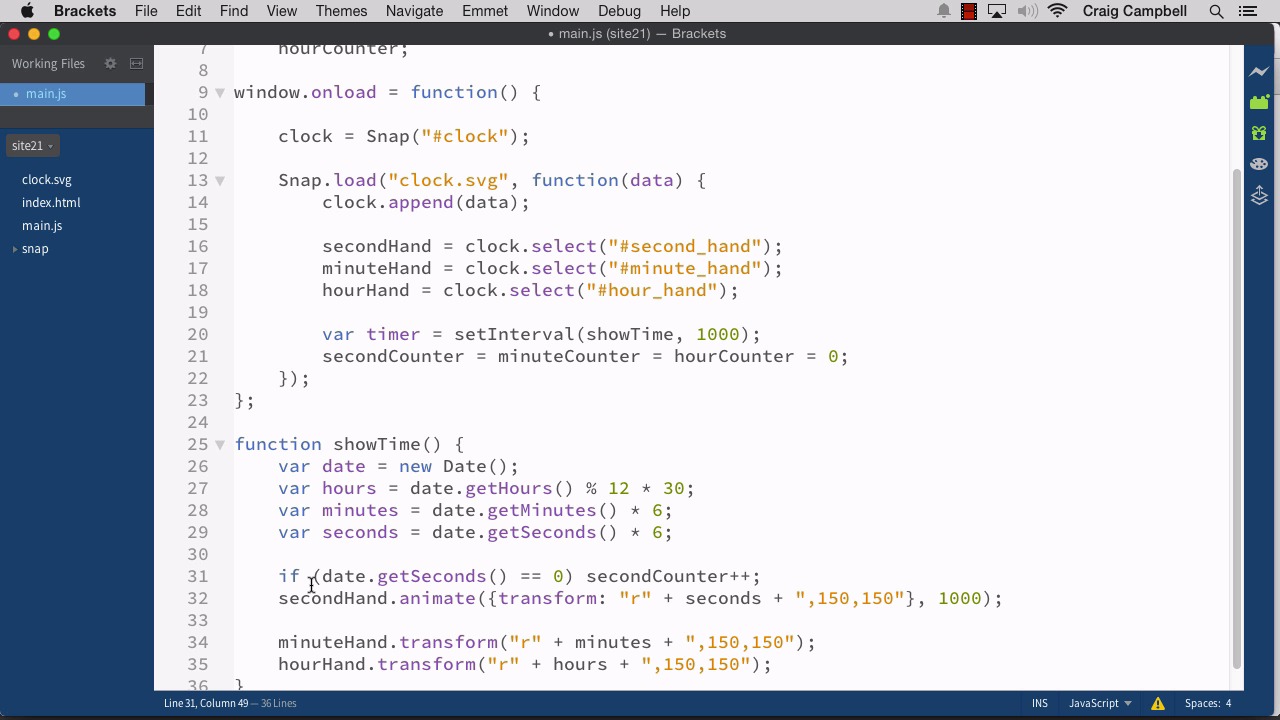
Hello and welcome back to animating with Snap.svg. In our last lesson we started animating the second hand but we noticed a problem when our second hand got back up to the one minute mark. The problem is that it's trying to animate from 354 degrees all the way back to zero degrees. So instead of continuing to move in the same direction, it animates back counterclockwise all the way back to the one second mark. Obviously that's not what we want. So what we want to do is we want to create a counter that's going to keep track of how many times we've rotated around. And we're gonna use that counter to determine what degree of rotation we need to move to instead of moving all the way back to zero. So instead of moving from 354 degrees all the way back to zero, we wanna move from 354 to 360 and then we'll keep increasing that number as we move around. So we'll go from 360 to 366, etc., etc. So that number's gonna keep getting bigger. But by constantly increasing that number, we will maintain a smooth animation and the second hand will continue moving in the same direction. So let's talk about how we're gonna do that. I'm gonna jump back in to finder and let's make a copy of the site20 folder and we'll save it as site21. And all the changes we make in this lesson will be saved in that site21 folder. So let's pull that into brackets, open up our main.js file, and let's make this happen. So as I mentioned, we're gonna be creating a counter, and that counter is going to keep track of how many times are secondhand has moved all the way around back up to the one minute mark or the zero second mark. So I'm gonna need to access this counter variable from within our callback function in order to initially set it to zero. And then also inside our show time function in order to increase that value by one, every time we make it all the way round back up to the zero second mark. So since we need that variable accessible from multiple places, I'm just going to include it in our global variables up here at the top. So we have our clock variable, our secondHand variable, our minuteHand and hourHand. I'm just going to put those on separate lines so that it's a little easier to read. And then we're also gonna need a variable for secondCounter. We'll need one for a minute counter as well, because we're gonna encounter the same problem with our minute hand and hour hand, so we'll do another one for hourCounter. So now that we've created those variables, let's set them to zero initially when our clock first loads. So inside this callback function, after our set interval method or you can do it before, it doesn't matter. We just need to initially set that value to zero. So we're going to point to second counter and set it equal to zero. Now we need to do the same thing for our minuteCounter and hourCounter. But instead of taking up three lines of code to do that, we can do this all in one line of code. And the way we do that is we would set secondCounter equal to minuteCounter. Here we go, equal to hourCounter equal to zero. So that will set all three of these values equal to zero initially. And then inside our showTime function, we can check to see If we've made it all the way back around to the zero second or zero minute or zero hour mark. And if we haven't made it back then we would increase that counter by one. So the way that's gonna look in our code is we're going to do an if statement here. And we're gonna say if Date.getSeconds, and the reason we're using that instead of this seconds variable is because remember this seconds variable is actually converting that into degrees. We don't need degrees right now, we need the actual seconds in numbers or as an integer. So if date.getSeconds is equal to zero, because that's what it's gonna be equal to once the second hand gets back up to the top. Then we're going to increase that second counter variable by one. So if that's true then we're gonna set secondCounter++. And adding that ++ to the end will increase that variable by one. Notice there's no space in between, if you put a space there then it's not gonna work. So secondCounter++ and then a semicolon to end our statement. So every time our second hand gets all the way back up to zero, it's going to increase that counter by one. So now we need to use that counter to determine what this value here needs to be, and this value is going to be the degrees of rotation. So once it gets up to 59 seconds and it rotates over to zero seconds, we don't want it to rotate backwards to zero degrees. Instead we want it to rotate forwards to 360 degrees. So we've increased that counter by one. Remember that the counter was initially zero. So if we increase that counter by one, that'll bring it up to a value of one. And if we multiply that by 360, that should get us where we need to be. So what we're gonna do is we're going to take secondCounter times 360, plus our value in seconds here. Now remember this value here is in degrees, so that's the number of degrees per second. And if we string all of this together, and we need to put this in parentheses first of all. And the reason for that is we've combined to some arithmetic with some string concatenation. And all that means is we're trying to pull this string together we've got the "r" here and then the value that we're gonna put here, and then more values over here. And we're using the + character, to string those together. But we're also using a + character right here. But in this instance we're not using it for string concatenation we're not using it to pull a string together instead we're using it here for arithmetic. So we need to put all of our arithmetic together inside parenthese so that our browser doesn't get confused. So again, just to review what's happening here is our second counter is initially gonna be set to zero. So when we first see our second hand on the screen, that second counter's gonna be set to zero. So it's just gonna be zero times 360, which is just zero plus the number of seconds that have elapsed in the current minute. So that second hand is going to keep animating around and then when it gets back up to the zero second mark, this second counter is going to increase by one. So it's going to be set to one now. And if we do one times 360 plus zero seconds, because it's at that point where it reaches zero seconds that our second counter is going to increase, our seconds then it's gonna be set to zero. But one times 360 is set to 360 so we're back up to 360 degrees. And then as our seconds keep increasing that value is gonna keep increasing as well. So if that didn't make sense, go ahead and finish watching the video, and then watch it again a couple of times until it does make sense. Hopefully I've explained it thoroughly enough, if not too thoroughly, but let's go ahead and give that a shot. So, with our code in place, let's jump back into our browser. And then let's navigate forward to the site21 folder, and let's do it quickly, so we can see it happen. And there we go. And sure enough as it reaches the 60 second mark, that was a close one by the way. As it reaches the 60 mark instead of rotating backwards counterclockwise it continues to move forward. So we do need to double check. Any time you're running complicated code like this you need to keep watching and make sure that it's going to keep working. Now, obviously we're not going to sit here for 60 or however long to make sure that this keeps working. But I think if we do two rotations that should be good. So we've already gone past the 60 second mark once. Let's do it one more time, just to make sure it's still working. So I'm gonna pause the video. And once we get back down to like five seconds or so, we'll continue. So we're back under ten seconds and I just wanna make sure one more time that our second hand is gonna keep moving smoothly, as we move to the next minute and sure enough it does. We don't see any weird rotations going the other way. So let's jump back into our code. And that's how you keep your second hand rotating the same direction without having to watch it flip back every minute on the minute. So again, we've just added a little bit more to our calculations here, but hopefully it all makes sense. Again, if it doesn't make sense, just watch the video again, listen to the explanation again until it starts to sink in. It's very possible that I've over explained this, but I just wanna make sure that we understand what's happening here. Because we're about to have to do the same thing to the minute hand and the hour hand. So thank you for watching, and I'll see you in the next lesson.





