

- Overview
- Transcript
5.5 Time Is Circular
You’ve learned how to rotate your clock hands, and you’ve learned how to tell the time. But how do you translate the current time into the proper rotation? In this lesson, you will learn how to rotate the second hand to keep up with the current time.
1.Introduction
1.1Introduction00:52
1.2Downloading Snap.svg07:42
2.Creating Graphics in a Snap
2.1Creating Basic Shapes09:38
2.2Complex Shapes08:16
2.3Shape Attributes05:57
2.4Grouping Shapes07:23
2.5Shape Transformations08:37
3.Animating in a Snap
3.1Animation Basics06:58
3.2Animation Callbacks04:53
3.3Easing06:26
4.Basic Interactivity
4.1Installing MAMP03:33
4.2Using an External SVG08:46
4.3Targeting Individual Shapes08:58
4.4Basic Interaction06:32
4.5Hover Events03:32
5.SVG Clock Animation
5.1Importing the Clock SVG06:08
5.2Targeting Individual Clock Shapes08:30
5.3Pulling the Current Time08:30
5.4Organizing the Code05:32
5.5Time Is Circular07:26
5.6Staying Current03:08
5.7Animating the Second Hand03:11
5.8Fixing the Second Hand Animation08:51
5.9Minutes and Hours09:43
5.10Adjusting the Hour Hand03:44
5.11Finishing Touches05:31
6.Conclusion
6.1Conclusion00:54
5.5 Time Is Circular
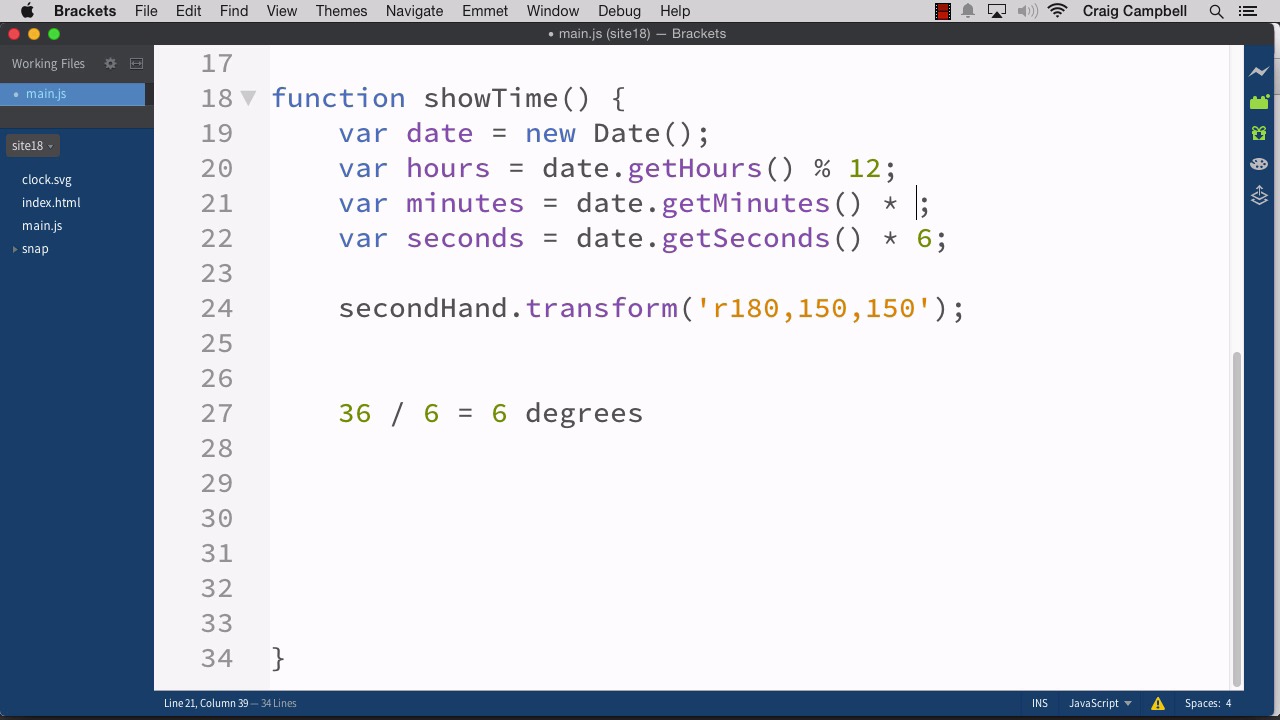
Hello, and welcome back to Animating with Snap SVG. Now that we've got our code a little bit more organized, we can get started calculating our degrees of rotation. So let's start by making a copy of the site17 folder, and we'll call it site18. And all of the changes we make in this lesson will be saved there. So we'll open that folder up in brackets. And here's our show time function that we created in the last lesson. And you might be wondering why I moved this code down here into a separate function. Instead of just keeping it inside the callback function like we had it before. Because after all, in this callback function, we're calling on that logic right here. However as we mentioned before. We're eventually going to have to get the current time. Over and over again once per second. In order to keep our clock. Up to date so that it's continuously animating so we can always see that second hand moving around. Which means we're going to have to call on this show time over and over again. We're going to have to run this logic over and over again. So if you're going to run it over and over again, it's a lot easier to put it in a function like we did in the last lesson. So now that we've done that we need to figure out how to convert our hours, minutes, and seconds into degrees of rotation and I wanna start with seconds, because it's the one that's gonna be constantly moving or constantly animating throughout the entire time that you've got the browser window open. So let's start with seconds, and this is really just gonna take a little bit of math, so let's jump down into our showTime function. And in addition to creating our transformations here, we also need to Include all of this date, time stuff here. So I'm gonna cut all of this code. And we're going to put it into the Showtime function as well. Since this function again is going to be running over and over again once per second. So we've calculated the date, hours, minutes and seconds. And now, again, I want to convert seconds into degrees. So I'm going to make our code a lot bigger so I can illustrate this a little easier. And when you're dealing with a circle, you've got 360 degrees in a circle, so 360 degrees will get you all the way around. If we're thinking about the second hand moving around the clock, once it gets all the way around and pointing straight up again, we've rotated it around 360 degrees. So if we wanted to point to 30 seconds for example, we would take half of that. So 30 seconds would be 180 degrees. But I want to fine tune this a little more, because I need to calculate how many degrees there are per second, so if there are 60 seconds in a minute, all we need to do is divide 360 by 60. So, 360 degrees divided by 60 seconds in a minute will give us how many degrees per second. And if you want to make that math a little easier we can just drop the zeros on the end and we get 36 divided by 6, which is 6 degrees. So we have six degrees per second of rotation, so all we really need to do to convert our seconds to degrees is take our date.getSeconds value and multiply it by six which again is this value here. Now if you want to keep it from getting too confusing you could say, times 360 divided by 60 and that would give you the same result, but it's a lot easier just to bring that all together and multiply it by 6. So if we do date.getSeconds times 6 that gives us the number of degrees of rotation required for our second hand to get where it needs to be. So with our minutes, as you can imagine, it's gonna be the exact same thing. We're gonna multiply it by 6 because there are also 60 minutes in an hour. Now the hours are gonna be a little bit different because there are only 12 hours on the clock. There's 24 hours in a day, but there's only 12 hours that show up on the clock. So instead of doing 360 divided by 6, we need to do 360. Divided by, excuse me, 12. And if you divide 360 by 12 we'll get another nice round number, we get 30 degrees. So for every hour on the clock we're going to be rotating the hour hand by 30 degrees. So we're going to do date.getHours, modulus twelve which if you remember gives us the 12 hour time instead of the 24 hour time. And then we need to convert that to degrees by multiplying that by 30. So right now we could get a pretty good approximation of where we need to be by calling on the current time and rotating our hands according to these calculations here. So we've created our date, we've calculated the hours in degrees, not just in hours but in degrees. And we've calculated our minutes and seconds in degrees as well. So now for our second hand we're going to do a transformation. And we're going to have r and then the number of degrees we need to rotate it, and then the origin of our rotation. So that 150,150 is going to stay the same. But this 180 here is going to change. So what we need to do is to string some items together, and I'm gonna use double quotes here instead of single quotes. And for the 180, I'm going to get rid of that, and I'm going to, again, string some things together. So we have r plus some value here. And then the origin of our rotation. So by stringing these together using the concatenation operator, or the plus sign, we'll be able to get the value we need. So this value is going to be our degrees in rotation. And our degrees has already been calculated up here for seconds. So instead of value here, I'm gonna type seconds, and we'll see how that works. We're gonna do the same thing. I'm just gonna copy this entire line of code. And we're gonna do the same thing for minutes and hours. So we'll do the minute hand next. We'll do minutes here and then down here we'll do hours for the hour hand. So let's save that and right now where I am it's about 2:41 PM, so if I were to save my file, and then jump over to chrome, navigate to the site 18 folder and hit enter. Now we can see that we're at 2:00 here the hour hand is pointing at two, the minute hand is pointing at 41 minutes, and it looks like it was about 41 seconds as well whenever I first loaded the page. So we now know that everything is animating to the proper place. It's not really animating, it's just rotating as soon as the page loads but you get the basic idea. We can now calculate the current time very easily. And if I were to refresh the page once a second. We can see that second hand slowly moving around. Now obviously we need to apply a little bit more logic in order to get the hour hand exactly where it needs to be because the hour hand doesn't just stay on two until it suddenly 3 o'clock and then jump down to three Instead it's slowly moving towards the 3:00 point as our time progresses. And we'll get to that in another lesson but for now we have a pretty good idea of how to convert our hours, minutes, and seconds into degrees of rotation. So thank you for watching, and I'll see you in the next lesson.





