

- Overview
- Transcript
2.4 Conceptual Sketching
Hi guys, welcome back to 30 Days to Your First Website Design, a Tuts+ Premium course. I’m Ian Yates, and today we’re going to get practical by looking into Conceptual Sketching (otherwise known as wireframing, or prototyping).
As usual, we’ll begin with a quick breakdown of what we’re going to cover in this video.
- First off we’ll ask ourselves what wireframing is, how we go about it and why it’s worthwhile.
- We’ll then look at some tools which will help you along
- Lastly, as ever, I’ll set you a little assignment before we jump into the next video.
When I was at art college (many moons ago) we used to do life drawing. Every week our life model Graham would drop his robe on the floor and contort himself for a good few hours. One of the most useful techniques I can remember being taught was taking a big stick of charcoal and being told to sketch one drawing per minute for ten minutes. To begin with we felt rushed, but the results were surprisingly effective; it made us really think about what the essentials of our drawings were without getting tangled up in the details (like Graham’s face).
We were sketching in its rawest form.
Wireframing appears to all intents and purposes to be a web design equivalent of this. But there’s one essential difference between sketching and wireframing. Sketching is part of the creative process – it’s brainstorming and experimenting.
Wireframing is more about visualizing the information architecture. It’s about getting layout and functionality ideas down, quickly. Establishing relationships. The bare bones of your finished design.
How to WireframeSo what do we need to practice wireframing? Well the tools are fairly complicated. You’ll need a piece of this (paper) and one of these (pencil). Yep that’s it.
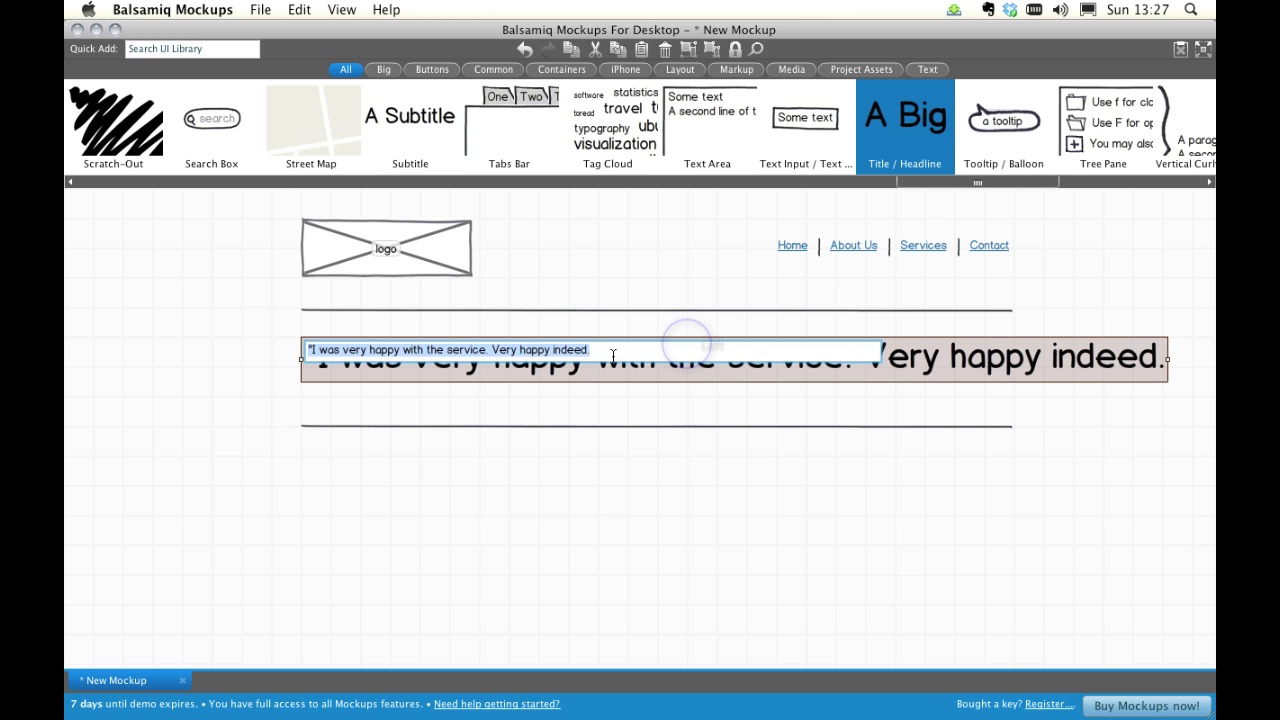
Of course, you can do your mocking up using all manner of available tools. There are templates for Photoshop, Illustrator, Fireworks, UI kits which can help you lay out web site elements quickly and edit them just as quickly if you need to. We’re now going to take a quick look at Balsamiq, a Flash-based rapid wireframing application, it comes in desktop or browser flavors, and it demonstrates perfectly how we can quickly pull together a wireframe. It’s not free unfortunately, but you can easily make use of the demo version, as I’ll show you now.
I’ve downloaded it and installed it to my system. Let’s open it up.
[Live screencast demo portions not entirely available in transcript.]
Now, you can see we have a canvas here, plus a menu and a toolbar at the top. Controls are self-explanatory. The menus are intuitive and if you’re used to working with any graphic application you’ll have no trouble at all.
Let’s begin with our empty workspace. Now we can use the tool bars to place various elements on our page. We can quickly build up a sketch of our web page. It needn’t be perfect, we’re looking to demonstrate relationships between the elements on the page and get a rough idea of the layout. It’s great for your own reference, it’s great for communicating with colleagues how you envisage a layout, and it’s perfect for demonstrating web projects to clients.
We can use assets of our own, we can place the actual logo or images on our canvas I we want. But we can also, save the resultant wireframe as a graphics file (png) to our system and play with it further in Photoshop.
So there you go, a quick way of fleshing out your wireframe.
Next StepsTime for some further reading, I have a couple of examples. They’re more resources you’ll want to check out than required reading.
Firstly: Wireframes Magazine. A blog about everything wireframe. It’s full of examples, resources, tools and news. You’ll be amazed at how much there is to say about wireframing!
Secondly, take a look at Web Without Words – it’s a quirky online resource which demonstrates loads of familiar sites, in wireframe form. It’s a great way of stepping back and examining the skeletons of effective web design. Recognize this one? Of course you do..
Lastly, if you’re interested in seeing ANY website wireframed, check out the wirify bookmark tool – wirify.com, drag it into your bookmarks,click it whilst visiting any webpage you choose and you’ll see that page wireframed.
Finally, a wee assignment. I want you to go away and sketch up a wireframe of our corporate site. It doesn’t matter how you do it, whether you use pen and paper, or opt for a tool of some kind. The important thing is to visualize the relationships between all elements you sketch out.
OK, that just about wraps up wireframing. Next time on 30 Days to Your First Website Design, we’re going to look at using Grids. I’m Ian Yates, and from all of us here at Tuts+ thanks for watching!
1.Introduction
1.1Introduction02:44
1.2What is Web Design?06:01
1.3Usability06:07
1.4Content05:20
1.5Goals05:27
2.Planning
2.1Three Don'ts of Design Theory02:48
2.2Inspiration05:45
2.3Style and Theme06:05
2.4Conceptual Sketching11:12
2.5Designing with Grids09:01
2.6The Anatomy of a Webpage05:44
2.7Whitespace05:03
3.Design Concepts
3.1Backgrounds and Textures10:18
3.2Navigation08:31
3.3Web Typography09:12
3.4Features Section16:04
3.5Contact Form12:25
3.6Footer Section09:05
3.7Prepping Your Design05:23
4.Site Elements
4.1Sprite Sheets14:07
4.2Project Organization04:47
4.3Code Editors14:45
4.4Web Standards Model16:25
4.5Semantics14:36
5.Prepping Your Design
5.1Further into CSS12:49
5.2Browsers16:50
5.3Behavior: jQuery slideshow12:43
5.4Form Validation13:23
5.5Cross Browser Testing11:21
5.6Google Analytics07:25
6.Conclusion
6.1Conclusion00:48





