

- Overview
- Transcript
5.4 Form Validation
Lesson Notes * jQuery plugin: Validation * HTML5 Form Validation
Transcript Hi guys, welcome back to 30 Days to Your First Website Design, a Tuts+ Premium course. I’m Ian Yates and today we’re going to continue with the behavioral aspect of our corporate website by implementing some form validation.
We’ll begin as always by taking a quick look at what we’re going to cover in this video:
- Firstly, we’ll look at what form validation is.
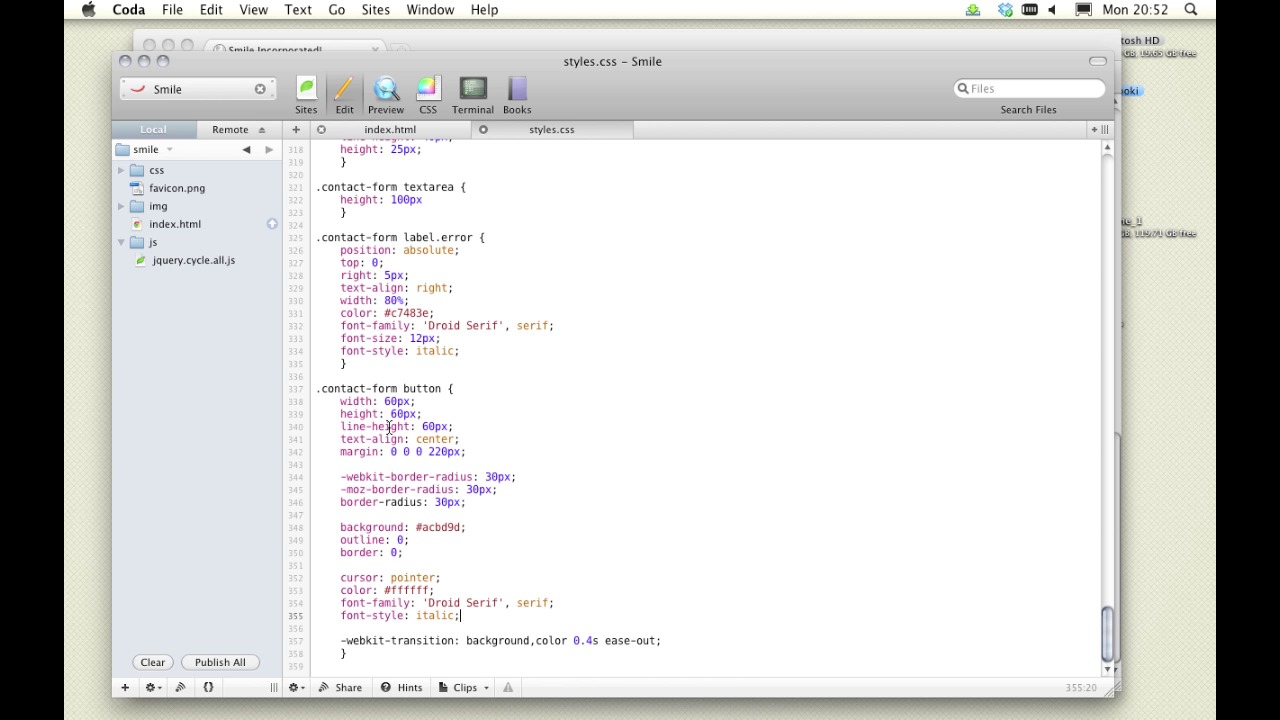
- Then, we’ll move into our own project and update our CSS to style the form.
- Once that’s done, we’ll look at using a jQuery validation plugin.
- Lastly, as ever, I’ll point you toward some further reading and set an assignment.
Now, we’ve discussed forms before, while we were designing our own. And we mentioned that forms are a classic potential stumbling block for users. One aspect of ensuring good usability on a form, is to implement good form validation. We need users to understand what is required of them, and in the event of them not complying (by neglecting to fill in crucial information for example) we need them to be made clearly aware of it.
Correct completion of a form is also often necessary for the form to actually work. If an email address is incorrectly entered, that could have problematic consequences.
So, how do we validate form data? Well, we need to check what’s been entered as soon as the form is submitted. This can be done server-side, ie: the data is checked by a php, asp, ruby script for example, then in the event of a problem, returns to the form to alert the user. We can also do this client-side using Javascript (which is what we’re going do using a jQuery plugin). In our case the data will be checked real-time.
It’s also possible these days to use validation native to HTML5. This is in its early stages of implementation of course, and not all browsers support it. It will no doubt become standard relatively soon.
For now though, let’s jump into our CSS and cleanup our own form.
[Live screencast demo portions not available in transcript.]
Validation courtesy of Jorn Zaefferer, who’s one of the main contributors to the jQuery library. It’s a rock solid plugin with years of development behind it, and has been used on some pretty big sites.
Next Steps OK, it’s time for some further reading: we mentioned the most recent alternative to our jQuery form validation, and that is the native HTML5 validation. If you’d like to know more about its potential and its current drawbacks, take a look at what Peter Gasston has to say on the matter: HTML5 Form Validation.
And before we move on to the next video, I’d like you to continue with our design, grab the form validation plugin and bring the site up to date.
Next time on 30 Days to Your First Website Design we’re going to look at cross-browser testing. I’m Ian Yates and from all of us at Tuts+ thanks for watching!
1.Introduction
1.1Introduction02:44
1.2What is Web Design?06:01
1.3Usability06:07
1.4Content05:20
1.5Goals05:27
2.Planning
2.1Three Don'ts of Design Theory02:48
2.2Inspiration05:45
2.3Style and Theme06:05
2.4Conceptual Sketching11:12
2.5Designing with Grids09:01
2.6The Anatomy of a Webpage05:44
2.7Whitespace05:03
3.Design Concepts
3.1Backgrounds and Textures10:18
3.2Navigation08:31
3.3Web Typography09:12
3.4Features Section16:04
3.5Contact Form12:25
3.6Footer Section09:05
3.7Prepping Your Design05:23
4.Site Elements
4.1Sprite Sheets14:07
4.2Project Organization04:47
4.3Code Editors14:45
4.4Web Standards Model16:25
4.5Semantics14:36
5.Prepping Your Design
5.1Further into CSS12:49
5.2Browsers16:50
5.3Behavior: jQuery slideshow12:43
5.4Form Validation13:23
5.5Cross Browser Testing11:21
5.6Google Analytics07:25
6.Conclusion
6.1Conclusion00:48





