

- Overview
- Transcript
5.2 Commands
In this lesson you’ll learn about commands. These are instructions you can pass to Cycle slideshows after they have been initialized. There are ten in total, so let’s make a start.
1.Introduction
1.1Welcome00:34
1.2Why Cycle2?02:22
1.3Plugin Installation and License01:30
1.4A Basic Example03:19
1.5Settings Options04:42
2.Basic Usage
2.1Captions04:58
2.2Using Navigation Controls04:42
2.3Slideshow Effects and Options04:36
2.4Continuous Slideshow03:49
2.5Using Overlays04:32
2.6Using Pagers08:34
2.7Using Non-Image Slides03:34
3.Advanced Usage
3.1Auto-Height06:27
3.2Image Loader05:19
3.3Progressive Loading08:54
4.Optional Plugins
4.1Carousel09:04
4.2Flip and Shuffle05:53
4.3ScrollVert and Tile03:29
4.4Caption2 and Center05:55
4.5Swipe02:12
4.6YouTube05:22
5.The API
5.1Options09:45
5.2Commands07:15
5.3Events04:09
5.4Cycle States and Hash04:51
5.5Template Customization02:27
6.Conclusion
6.1Final Words00:42
5.2 Commands
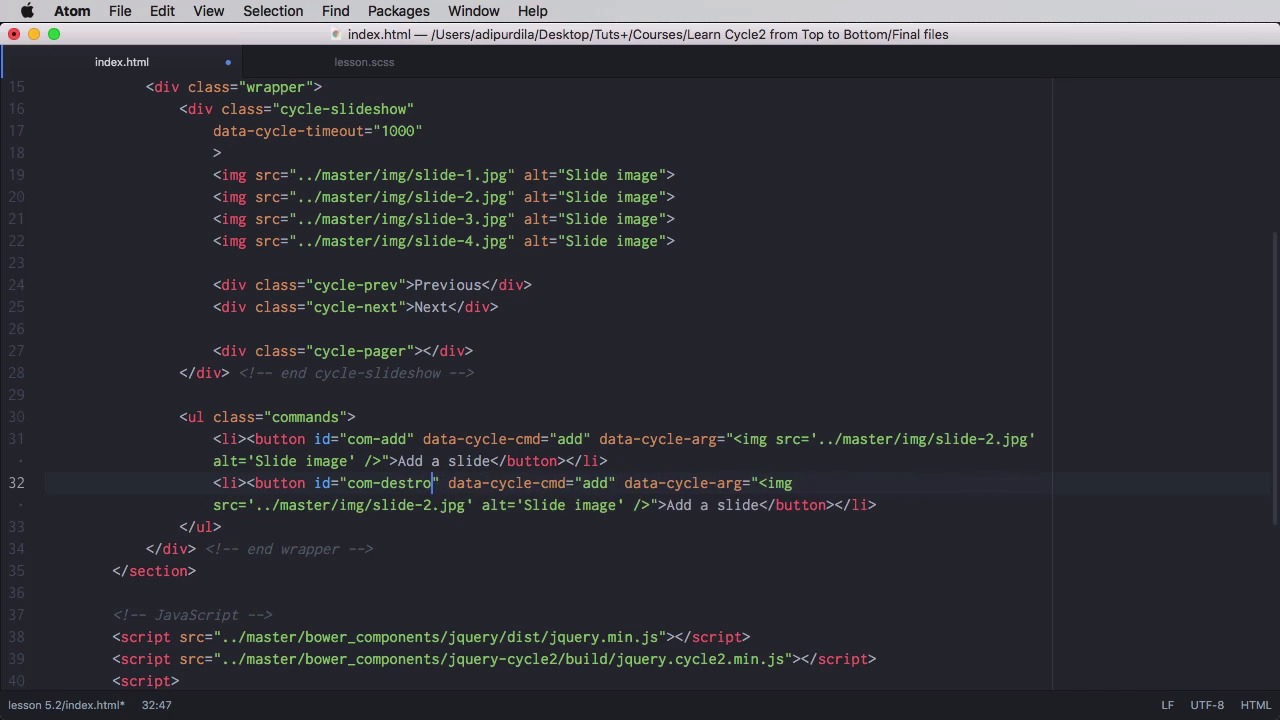
In this lesson, you'll learn about commands, and these are instructions you can pass to use cycle slideshows after initialization. There are ten in total. So let's begin. To show you these commands, I'm going to create a container for them. So UL What a class of commands and each command will be triggered by a button inside a list start up now the first command is called ad and its purpose is to add one or more slides to a slide show. So let's say a slide and we're going to give it an ID of COM from command at and let's give it some styling. For styling, nothing fancy, some margin. Set the padding to zero. And said the list-items to inline block. So they're all displayed on a single row. So now the commands will be right here. Now you can issue a command in two ways. Either via markup Using data attributes or in JavaScript and I'm going to show you both ways for two of these buttons, but for the rest we're going to stick with the markup version. So to add the slide via markup. We're going to do this we're going to say data Cycle CMD for Command. We're going to say add the name of the command and then that a cycle, ARG is going to be as follows. So, we're doing the command name and the arguments and the argument is going to be an image. We're going to replace the double quotes with single quotes, the SRC. Let's go to your master I N G slide .Jpeg. alter is going to be slight image and let's check it out. Currently we have one, two, three, four, images add one and we have five. Images. While the fifth one is a replica of the second image And we can had as many of these images as we want. Of course, when we refresh the page, those images will be gone, so that is the mark up method. To do the same thing in JavaScript, we would do the following. Declare a script, we'll say function. We'll declare a variable called slideshow and will target our cycle slide-show. And then we're going to target our command button, on click. We're going to say E prevent the faults, and then we're going to declare a variable called new image that's going to have the same S.R.C., as we did here. So basically we're going to copy this like that and then we'll say slide show cycle at so we pass in the name of the command and the argument which is new image. So now if we didn't have these attributes here, we can still achieve the exact same effect using JavaScript. But, for now, we're gonna keep those in the HTML, and we're gonna comment this bit. So, now that we have a starting point, let's move on with the next command, and the next one is called destroy. And what it's doing, it's basically destroying the instance of the slideshow, the instance of cycle. So, we're gonna say com. Destroy the command will be destroyed and we don't have any kind of parameters. We're gonna say here destroy slideshow. So if I click this it's gone. I just have like normal markup here. I cannot add a slide anymore because I don't have a A cycle instance is just gone. The next two buttons are for previous and next. So let's copy those. I'm going to have com next. That's the command. We're going to say next slide and this will be previous. The command is prev, previous slide. Tried again next, next, next, previous, previous it's the same action as These two buttons here. Now if you want you can also add this functionality in JavaScript. So for example let's say on the next Button. Now let's remove that and I'm gonna copy that but I'm gonna say com-next click function (e) we don't need this bit anymore. Instead what we're gonna do is say slideshow Cycle "next". Just like that. And now it still works as expected. So that's how you create or give these commands from javascript let's move on. The next command is called Go To and this will transition the slide show to a particular slide. You would say data cycle command Go To an argument. I put two here for slide with the index to. So that is the third slide now so if we go to slide. Let's go here. Go and it takes us to the third slide. We have five commands left. And they are as follows, pause, which will pause the sideshow, so currently it's all running, I pause it, then we have resume, and the command is resume, will resume a paused sideshow. Next we have stop the command is stop. It will simply stop the slide show. It doesn't matter if we click resume now, it's not going to work because it's not paused it's stopped. The next one is called reinitialize slide show. Now reinitialize slide show is the equivalent of giving the destroy command and then Re-initializing cycle. Now so it's basically a refresh. Now you should notice that adding a slide here and then hitting the reinitialize will keep that slide or both slides as you can see here because they are added in the markup. Now if I do destroy and then I do reinitialize, it doesn't work So just keep that in mind. And finally remove a slide has the command of remove or go and you passon zero based in the X. of the slide in our case is zero means remove the first slide. So if we have a running slide show remove one remove, remove until there is nothing left. That's it for commands. Now a huge part of the cycle A.P.I. is represented by events. We'll have a look at those in the next lesson.


