

- Overview
- Transcript
3.3 Progressive Loading
Progressive loading is a feature which allows a Cycle instance to download images on demand. This means you can create a very bandwidth-efficient slideshow. Let’s find out exactly how it works.
1.Introduction
1.1Welcome00:34
1.2Why Cycle2?02:22
1.3Plugin Installation and License01:30
1.4A Basic Example03:19
1.5Settings Options04:42
2.Basic Usage
2.1Captions04:58
2.2Using Navigation Controls04:42
2.3Slideshow Effects and Options04:36
2.4Continuous Slideshow03:49
2.5Using Overlays04:32
2.6Using Pagers08:34
2.7Using Non-Image Slides03:34
3.Advanced Usage
3.1Auto-Height06:27
3.2Image Loader05:19
3.3Progressive Loading08:54
4.Optional Plugins
4.1Carousel09:04
4.2Flip and Shuffle05:53
4.3ScrollVert and Tile03:29
4.4Caption2 and Center05:55
4.5Swipe02:12
4.6YouTube05:22
5.The API
5.1Options09:45
5.2Commands07:15
5.3Events04:09
5.4Cycle States and Hash04:51
5.5Template Customization02:27
6.Conclusion
6.1Final Words00:42
3.3 Progressive Loading
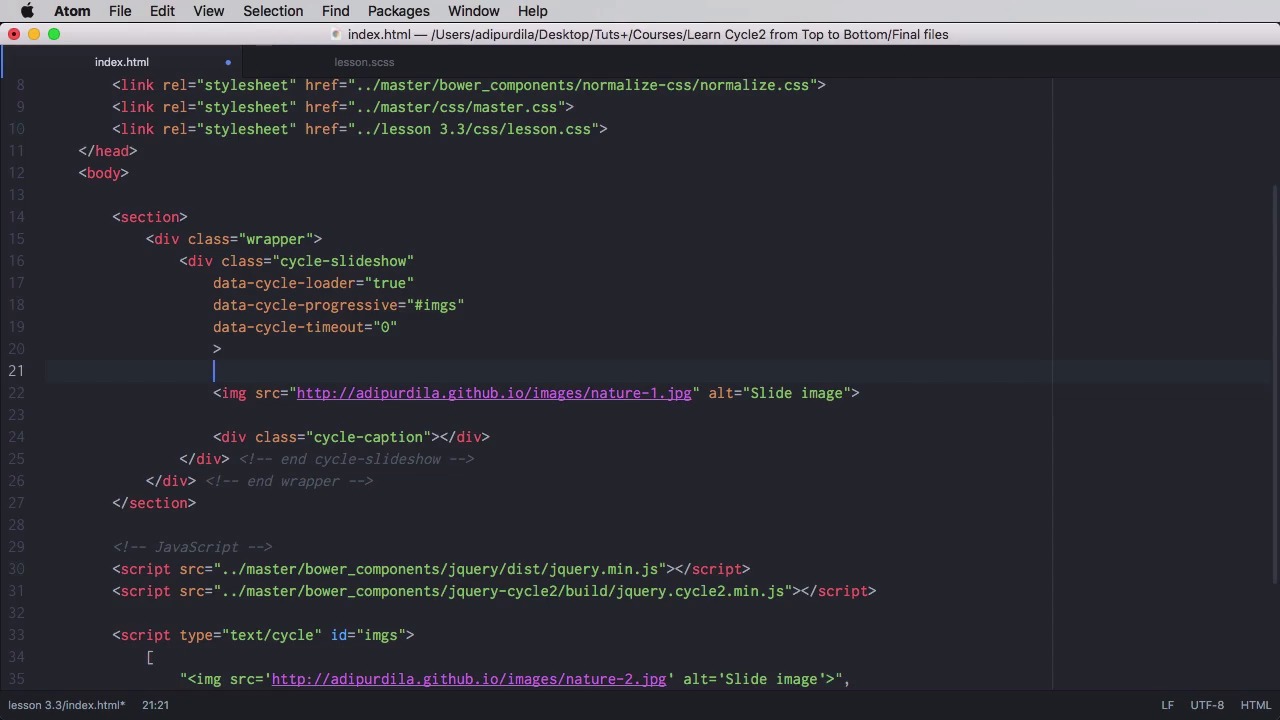
Progressive loading is a feature that allows Cycle to download images on demand. And that means you can create a very bandwidth-efficient slide show. Let's find out how this works. First of all let's have a look at how this slider works. So we have four images and when we're loading the page basically a request will be sent to the server to download these images. In fact four requests will be sent, and this of course, takes time. And depending on what connection you're on, it can take a pretty long time. What if we don't need all four images in the beginning? What if we just load the first one and then the other ones will be loaded on demand as they are needed. That's a much more efficient approach because let me give you an example on this. Let's say you're on you're landing on a home page of a website and that website has a slider with five slides. But the home page is just the gateway to another page that you are looking. So instead of waiting for all the images in those five slides to download, which may take a while. Why not download the one image and that will allow you to go to the page that you want much faster, right? Let's actually see an example here, I'm gonna do some throttling again. And this time I'm gonna use, let's see, maybe a regular 4G connection. I think that will do the trick, okay? So let's use that, and let's do a refresh. Yeah, just noticed the behavior. The slides are already changing. So now, let's start with this. We're gonna remove these images from the slider, and we're gonna put them in JavaScript as json data. So we'll do a script and it will send the type and this is important to text-cycle, and will give it an ID, for example, images.imgs. And inside, we're gonna do this we're gonna paste these in, yeah, we're going to replace all the double quotes with single quotes like this and we'll use double quotes on all of these strings and of course we'll use commas. So this is a correct format for a json array. Next what you need to do is going here and you would set that a cycle-loader to true and that a cycle-progressive and you would give the idea of imgs. So let's have a look at the example after we've done this, right? So now We just loaded the first slide. Yeah, and you can see nothing is happening, there is no slide change. There you go that's the second slide. So the second slide was downloaded on demand. There is the third and then there's the fourth. So, let's actually see what happens if we set a timeout to zero. So data-cycle time out. We set it to zero so there is no automatic slide change, right? We do a refresh and the first image is downloaded, and now nothing is happening. No additional images are downloaded because they are not needed. We didn't make a request for new images. If I were to put some navigation controls here, or a pager, for example. But I think navigation control would be better. So, for example, let's do cycle-prev, previous, and a cycle-next. Next here, right? Okay, that should allow us to go back and forth between images. So now, if I do next, the image will be requested, so image number two. There it is, if I go previous it's just going to take me to at image number one. No additional images will be loaded because they are not needed. But if I do next and then next again image number three will be requested from the array that we created. And there it is, and it's gonna be the same for image number four. So this is just a fantastic option if you wanna minimize the impact of the image weights on the speed of your website. Now the other images that need to be downloaded can be set in either this format or you can set them and I'm gonna say alt=imgs here. You can set them without the double quotes, without the commas here, and of course replace all of these and we don't need these either. Remove those, and a small typo here, yeah, so alt-imgs. Let's replace this here, as well, and let's refresh. So now, it's waiting for the first image. There it is. Next and it began downloading the second image. Now this also works with non-image slides. So for example, I have a slider here, right? And it uses loader true. The progressive option is set to #slides, and we're considering slides the direct div descendants. Now, the slides will look something like this. Again, text/cycle, id, and then data-cycle-split equals this value. Now this value is used right here as a separator between each individual value. It can be whatever you want basically but just make sure it's the same. So now let's do a refresh. Now we're loading, we're waiting for the first slide, there it is slide one. And now it began loading slide two and there it is. So you see you don't necessarily need to use image slides, you can just use irregular non-image slides, but which contain images. In which case the the progressive loading and the loader options will still work. Now this is all done via HTML, but if you prefer JavaScript, you can do it from JavaScript. So for that I'm gonna copy this script here to show you how you can do it, so you do script. You don't need this bit anymore because it's a regular JavaScript, right? And you'll do var, let's call this slides equal, you would pass in the same type of format here. And then after it's done you would say cycle-slideshow cycle, right? So you would initialize it and then as the progressive option you would pass in slides, and this will work just as well. And that's it for the progressive loading. I think you should definitely use this every time you have images in your slideshow. Now, with this this we've finished the advanced usage chapter. Now let's move on, and learn more about some of the optional plugins, and we'll start in the next lesson with the carousel.


