

- Overview
- Transcript
5.4 Cycle States and Hash
In a previous lesson you learned about the Cycle options; these are contained in something called “option hash”. This is an object containing all the options for that slideshow. Now, this object contains some additional pieces called “state data”, which are read-only. Let’s learn more about what those are.
1.Introduction
1.1Welcome00:34
1.2Why Cycle2?02:22
1.3Plugin Installation and License01:30
1.4A Basic Example03:19
1.5Settings Options04:42
2.Basic Usage
2.1Captions04:58
2.2Using Navigation Controls04:42
2.3Slideshow Effects and Options04:36
2.4Continuous Slideshow03:49
2.5Using Overlays04:32
2.6Using Pagers08:34
2.7Using Non-Image Slides03:34
3.Advanced Usage
3.1Auto-Height06:27
3.2Image Loader05:19
3.3Progressive Loading08:54
4.Optional Plugins
4.1Carousel09:04
4.2Flip and Shuffle05:53
4.3ScrollVert and Tile03:29
4.4Caption2 and Center05:55
4.5Swipe02:12
4.6YouTube05:22
5.The API
5.1Options09:45
5.2Commands07:15
5.3Events04:09
5.4Cycle States and Hash04:51
5.5Template Customization02:27
6.Conclusion
6.1Final Words00:42
5.4 Cycle States and Hash
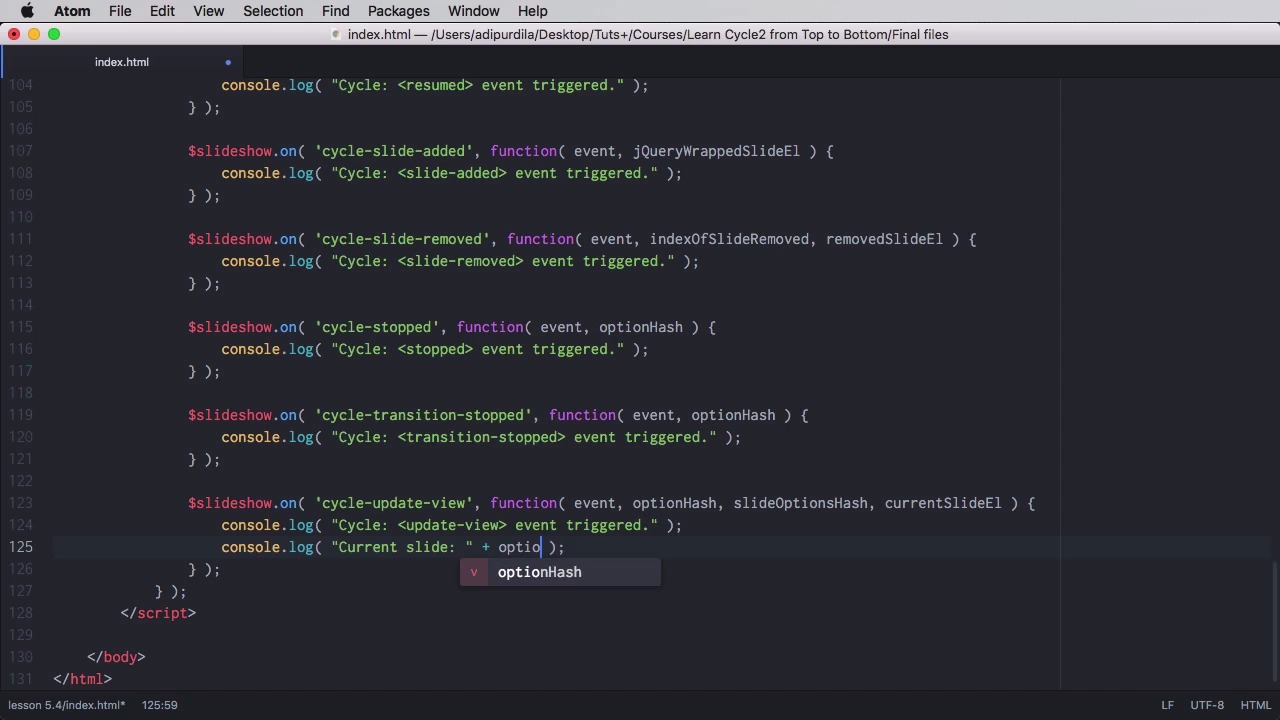
In previous lessons, you've learned about the cycle options. And these options are contained into an object that's called an option hash. Now this object, apart from the options, also contains some read-only data called state data. Let's see what that is. Let's actually begin with something called the hash. And do not mistake this for the option hash, which is the object with a bunch of properties. The hash is actually represented by an attribute called data cycle hash. And that can be applied to each slide in the slideshow. And if you assign a value to this attribute, then the location hash, or the address you see in the top of your browser, will be updated. Let's say for example that we're gonna add hashes to all of these slides. So we're gonna say, data-cycle-hash=, and let's do park, summer, leaves, and water. All right, so now notice that when the slides change, so does the hash or the page location. And the cool thing about this is, you can copy this link and share it with something else. And when they come back, they will open the slider at that exact slide, essentially creating bookmarkable slides. So with that out of the way let's learn a little bit more about this state data and the option hash. And for that, I'm actually going to tap into the cycle-update-view event, and do a couple of console logs here to show you what's going on. So state data is read-only. And there are six pieces of information you can get from this. You can get busy, so when a slide transition is active, then the busy state is active. You can get the current slide, the next slide. You can get the paused state. You can get the slide number and you can get the slide count. Let's do here a console log. We'll say current slide. And we'll tap into the option hash, the option hash, which is passed in as a parameter to this function. So optionHash dot, let's say, currentSlide. And then we're gonna say, The next slide is:, and we're gonna pass in optionHash.nextSlide + optionHash.slideCount. Let's see what's going on here. Gonna open up the console now. So see, update view event triggered. Let's actually pause the slideshow, yeah? So update view event triggered, current slide 0, the next slide is 1 out of 4. We go to the next slide, current slide 1 the next slide is 2 out of 4. So that's pretty cool. We can also show when the slide show is busy or when it is transitioning. console.log, we'll say Slideshow busy: + optionHash.busy. And this will return true or false depending on whether or not it's transitioning. And we can do the same with the paused state, so optionHash.paused. Let's have another look. So let's pause the slideshow. As you can see, Slideshow paused is triggered. And when I'm gonna go to the next slide, you can see that busy is true, pause is true. The slide has finished, the transition has finished. Busy is now set to false, slideshow is still set to true. And actually, if we do a console log, let's do this for a little bit of separation. If we do a console log to the entire option hash, that this is what we get. We get an object, [LAUGH] let's pause this again. We get an object, and you can see a whole bunch of properties here. Some you can change, some you can only read. And that's it for state data and bookmarkable slides. Now coming up, we'll have a brief look at the template customization that's available for Cycle. See you in the next lesson.


